The Run 3 Editor level database is the only part of Run 3 that doesn’t know what it is yet. Players have built thousands of levels in it — some nearly impossible recreations of extreme demon platformer patterns, some gentle introductory tunnels intended for newer players, some absurdly long endurance tests — and all of them exist because the Editor gave creators access to the same tunnel tile system the main game was built on, and creators found uses for it that no one specifically planned for.
| Genre |
Endless Runner / Level Creator |
| Platforms |
Browser (Flash, HTML5) |
| Setting |
Space tunnel system |
| Playable Characters |
Runner, Skater, Child, Lizard, Gentleman, Bunny, Pastafarian, Duplicator, and others |
| Editor Feature |
Create, share, and play community tunnel levels |
The Galaxy Map and How Levels Connect
Run 3’s campaign unfolds on a Galaxy Map — a branching network of paths connecting individual tunnel levels. The map has a main tunnel route and multiple branch paths, some of which require completing prerequisite levels to unlock. Each point on the Galaxy Map corresponds to one tunnel level, and the campaign involves traveling outward through the map while unlocking characters and discovering what lies further along the branches.
The Editor extends this same structure into the community space. Editor-created levels can be published to a database where other players access and run them, functioning as an extension of the Galaxy Map concept into user-generated territory. Unlike the main campaign tunnels — which have fixed tile arrangements and fixed character assignments — Editor levels can specify which characters are able to run them, which difficulty settings apply, and how the tunnel geometry is arranged from start to finish.
The galaxy map design also affects how long campaign players spend in Run 3 before discovering the Editor. The main campaign’s branch structure is substantial enough that many players complete dozens of levels without realizing the Editor exists as a separate content source. Players who find the Editor early typically do so through the community side — discovering published levels created by others and then investigating how those levels were built — rather than through the campaign itself.
Characters and Their Different Abilities
Run 3’s cast of characters is not cosmetically differentiated — each character has meaningfully different movement properties that change how levels play:
- Runner — the default character. Jumps to a moderate height, moves at medium speed, and has standard air control. The most forgiving character for general tunnel navigation.
- Skater — moves faster than the Runner but has reduced air control and cannot change direction easily while airborne. Effective on wide platforms; struggles with narrow sections that require precise mid-air correction.
- Child — moves slowly but jumps very high and has extended hang time. Useful for tunnels with tall gaps but makes fast-approach obstacle sections harder because extra air time creates positioning drift.
- Lizard — can change gravity while in the air, switching between floor and ceiling without needing a surface to push off. This unlocks routing options that other characters can’t access.
- Gentleman — floats slowly downward after a jump rather than falling at standard rate. Good for precise landing control on narrow platforms; less effective in speed-oriented tunnels.
- Pastafarian — creates a temporary bridge of tiles where there are gaps while running, filling missing floor sections. The bridge fades after the Pastafarian passes. This character can navigate levels that technically have uncrossable gaps in the floor if they maintain momentum.
- Duplicator — spawns a child-clone during play that mirrors some movement actions. The gameplay implications of the clone are complex and the community has developed specific strategies for levels where the Duplicator’s clone enables paths that are inaccessible to single characters.
Editor levels specify which characters can play them, and the best Editor levels are designed around the properties of specific characters rather than built as generic tunnels. A level that works brilliantly for the Lizard’s gravity-flip ability may be nearly unplayable for the Runner, and the most respected Editor creations are ones that used a character’s specific properties as the design premise rather than as an afterthought.
Tunnel Physics and the Tile System
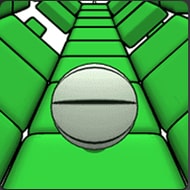
Run 3’s gameplay is built on a hexagonal tile system — the tunnel floor, ceiling, and walls are composed of individual tiles that can be present or absent. A missing tile creates a gap the player must jump over or avoid falling through. The tunnel’s cross-section is a six-sided shape, and the player can run on any face of the hexagon that is below the current gravity direction. When the tunnel rotates — a standard Run 3 mechanic — the player can potentially run on different faces depending on how the rotation interacts with momentum.
The Editor exposes this tile system to creators, allowing them to specify which tiles are present or absent in each section of a custom tunnel. This creates a system where tunnel difficulty can be tuned precisely: more missing tiles means more gaps to navigate; specific missing tile patterns create specific obstacle shapes; tunnel rotations can be placed mid-level to shift which face the player is on mid-run.
A tile detail that beginners often miss: some tiles in Run 3 appear slightly differently depending on whether they are normal structural tiles or “dark” tiles with higher fall-through contrast. The visual difference between a tile that appears solid but is actually a gap varies across tunnel level types. Editor levels created by experienced builders use this visual distinction deliberately to create moment-of-surprise difficulty spikes where tiles the player expected to land on are absent. This “tile deception” technique is controversial in the community — some players consider it clever design, others consider it cheap difficulty that relies on unfair information rather than skill.
What the Best Editor Levels Do
The Run 3 Editor community has developed informal standards for what makes a good Editor level, built through years of playing and discussing published levels. The highest-rated levels share several characteristics:
- A consistent difficulty curve — levels that start at a playable difficulty and escalate within the level, rather than levels that spike immediately to maximum difficulty or stay flat from start to finish.
- Character specificity — designed with a specific character’s abilities in mind, using those abilities as gameplay opportunities rather than treating all characters as interchangeable.
- Readable patterns — gap and obstacle arrangements that players can learn from repetition rather than randomized arrangements that don’t reward pattern recognition.
- Meaningful tunnel rotation use — rotations that create genuine gameplay choices rather than rotations placed arbitrarily to add visual variety.
The most criticized Editor levels are those that increase difficulty purely through speed escalation without adding complexity, levels that place gaps in visually ambiguous positions where the player cannot distinguish between a tile and the absence of one, and levels that are too short to meaningfully develop the skills they nominally test. Length is a particular tension — very short Editor levels feel trivial even at high difficulty, while very long levels can become endurance tests that don’t add difficulty but do add tedium.
The Community Debate Over Editor Level Standards
The Run 3 Editor community has an ongoing tension between accessibility and quality that mirrors debates in almost every level-creation community. Because anyone can publish an Editor level, the database contains a wide range of quality — from carefully designed experiences to quickly built proof-of-concept attempts. Newer players often encounter low-quality published levels and form their opinion of the Editor based on those rather than the best the community has produced.
The community’s rating system attempts to surface higher-quality levels, but it favors popular levels over well-designed ones — a level that many players attempt and complete will accumulate more ratings than a technically excellent level that fewer players discovered. This popularity bias is a well-known issue in level-rating systems generally, and Run 3 Editor hasn’t fully solved it. The players who engage most deeply with Editor content tend to navigate by community recommendation rather than the built-in rating system, using forum discussions and community lists to find levels worth playing.
Questions About the Run 3 Editor
- Do Editor levels persist after the browser session ends? Published Editor levels are stored in the game’s online database and persist between sessions for players who have accounts. Unpublished levels in progress are subject to browser storage limitations — levels that haven’t been published may not survive a browser cache clear or a session timeout. Experienced creators build in shorter segments and publish work-in-progress versions to prevent losing progress, treating the published database as a save function rather than a final release step.
- Can all characters play all Editor levels? No — Editor level creators specify which characters are enabled for their level. A level designed around the Lizard’s gravity-flip ability will typically have the other characters disabled, because the level geometry would be either impossible or trivially easy without the Lizard’s mechanics. Browsing Editor levels by enabled characters is one of the most useful filters for finding levels appropriate to a player’s preferred character.
- Is the Run 3 Editor the same as the main game? The Editor is a separate mode within Run 3 that accesses the same physics engine and tile system as the main campaign. The campaign levels were built using essentially the same tools available in the Editor, which means well-built Editor levels are genuinely indistinguishable from campaign content in terms of gameplay quality. The main difference is the absence of story context and character unlocks in Editor levels — they are pure tunnel experiences without the Galaxy Map progression framework.
The Run 3 Editor’s lasting value to its community is that it transformed a finite campaign game into a platform with no defined endpoint. The tunnel system, the character roster, the tile physics — these were complete when the campaign concluded, but the Editor ensured they didn’t have to be used only once. Players who have completed the Galaxy Map and all its branches find the Editor database waiting with thousands of tunnels that use the same fundamental system to ask completely different questions about skill, timing, and character ability. The Pastafarian crossing a gap that shouldn’t be crossable, the Lizard flipping to the ceiling to avoid a tile pattern designed for floor runners, the Child floating down to a platform that the Runner would have overshot — all of it in the same neon space tunnels, going further out into the same galaxy, with no particular end in sight.